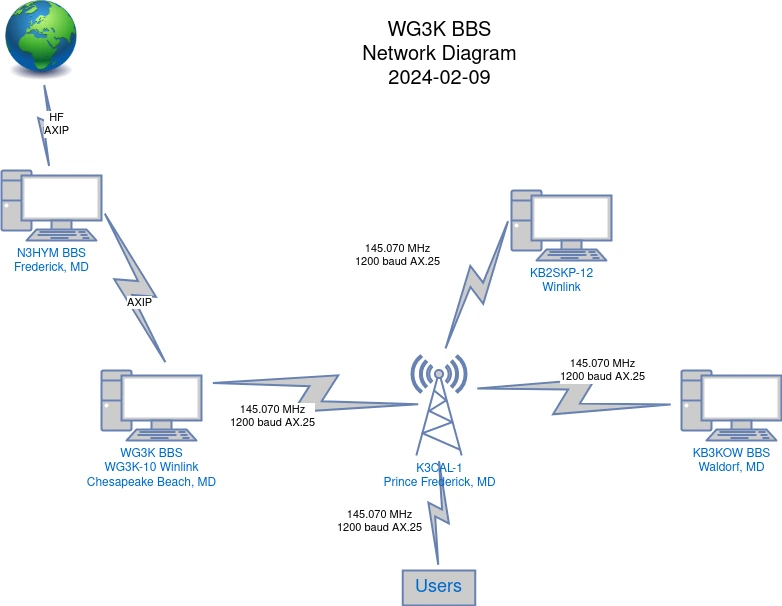
 The WG3K Bulletin Board System (BBS) is an instance of LinBPQ running on Debian Linux.
The system has a LAN connection to K3CAL-1 on 145.070 MHz at 1200 baud, AX.25, and a WAN connection to N3HYM in Frederick, Maryland, currently using an AXIP Internet connection.
Future plans are to replace the AXIP connection to N3HYM with an HF connection.
The WG3K Bulletin Board System (BBS) is an instance of LinBPQ running on Debian Linux.
The system has a LAN connection to K3CAL-1 on 145.070 MHz at 1200 baud, AX.25, and a WAN connection to N3HYM in Frederick, Maryland, currently using an AXIP Internet connection.
Future plans are to replace the AXIP connection to N3HYM with an HF connection.
What can I do with a BBS?
Imagine a large bulletin board with many papers stapled to it. The papers are generally all about radio and have been posted by amateur radio operators from around the globe. They are organized roughly by subject (ARRL and AMSAT bulletins, Keplerian data, stuff for sale, tech bulletins) and are distributed according to their distribution list (@WW, @NOAM, @USA, @EASTNT, etc).
There are also personal messages that are person-to-person as well as formal traffic messages (think NTS) that are routed to and from the NTSD network.
How to use
The BBS is simple to use. Connect to CBBBS (think Chesapeake Beach BBS) using a terminal program of your choice, attached to a TNC and VHF radio tuned to 145.070MHz, using the command C CBBBS. If you cannot reach the BBS directly, you can use the K3CAL-1 digipeater using the command C CBBBS VIA K3CAL-1.
Once connected, you should receive a prompt that looks similar to this:
[BPQ-6.0.24.1-B12FWIHJM$]
Hello Eric. Latest Message is 709, Last listed is 350
de WG3K>
Listing and reading your personal messages
LM (think, list mine) will list all messages that are addressed to you.
Example:
de WG3K>
lm
713    10-Feb PN     119 WG3K   @WG3K   WG3K   This is a test message.
712    10-Feb PN      94 WG3K   @WG3K   WG3K   TEST
667    09-Feb PY     878 WG3K   @WG3K   PE1RRR sending P-mail to @WW
632    08-Feb PY    1079 WG3K   @WG3K   G8BPQ  Re: Problems installing the GtTermTCP APK on Android
618    08-Feb PY     916 WG3K   @WG3K   KB3KOW Questions
603    07-Feb PY      60 WG3K           SYSTEM New User N3AE
From here, you can read individual messages using R <msg number> or you can read all your pending messages by using RM (think, read mine), which will display the messages newest-to-oldest, or RMR (think, read mine in reverse), to display your messages oldest-to-newest.
Example:
de WG3K>
rmr
From: WG3K
To: WG3K
Type/Status: PN
Date/Time: 10-Feb 15:00Z
Bid: 712_WG3K
Title: TEST

THEQUICKBROWNFOXJUMPSOVERTHELAZYDOG1234567890
RYRYRYRYRYRYRYRYRYRYRYRYRYRYRYRYRYRYRYRYRYRYR


[End of Message #712 from WG3K]
From: WG3K
To: WG3K
Type/Status: PN
Date/Time: 10-Feb 15:05Z
Bid: 713_WG3K
Title: This is a test message.

This is a test message.
THEQUICKBROWNFOXJUMPSOVERTHELAZYDOG1234567890
RYRYRYRYRYRYRYRYRYRYRYRYRYRYRYRYRYRYRYRYRYRYR


[End of Message #713 from WG3K]
de WG3K>
Once you have read your messages and no longer wish to keep them, you can kill them using the KM or the K <message number> command.
Example:
de WG3K>
km
Message #713 Killed
Message #712 Killed
de WG3K>|
Important
|
Issuing the km command will immediately kill all read messages in your queue. Using the k <message number> command is safer if you just want to kill a specific message. Messages that are left read, but not killed, will automatically be killed after 30 days. |
Sending a personal message
SP <Callsign>@<H-Address> (think, send personal to <callsign>)
<Subject>
<Text of message>
/ex (You must end your message with a "/ex" so the system knows you’re done.)
Example:
de WG3K>
sp wg3k
Address @WG3K.#SMD.MD.USA.NOAM added from HomeBBS
Enter Title (only):
This is a test message.
Enter Message Text (end with /ex or ctrl/z)
This is a test message.
THEQUICKBROWNFOXJUMPSOVERTHELAZYDOG1234567890
RYRYRYRYRYRYRYRYRYRYRYRYRYRYRYRYRYRYRYRYRYRYR
/ex
Message: 713 Bid:  713_WG3K Size: 119
de WG3K>
The message will then be immediately available to the receiver, if on the same BBS, or will be forwarded to the proper destination.
If you have setup your Winlink account by providing your CMS password, using the CMSPASS command, then you can send messages directly from the BBS to the Winlink network.
Example
de WG3K>
sp wg3k@winlink.org
Enter Title (only):
Test
Enter Message Text (end with /ex or ctrl/z)
This is a test message.
/ex
Message: 714 Bid:  714_WG3K Size: 25
de WG3K>
or using the rms: prefix to any e-mail address:
de WG3K>
sp rms:wg3k@wg3k.us
Enter Title (only):
Test
Enter Message Text (end with /ex or ctrl/z)
This is a test message
/ex
Message: 715 Bid:  715_WG3K Size: 24
de WG3K>
Messages sent to Winlink from the BBS will be sent directly to a Winlink RMS or, if Internet connectivity isn’t available at the BBS, will be forwarded to KB2SKP-12 over the air. HF forwarding of Winlink messages will be forthcoming.
Listing and reading bulletins
Like messages, bulletins can be listed so you can determine what you want to read.
Example:
de WG3K>
lb
710    10-Feb B$     743 WISDOM @NOAM   N0LAJ  Wisdom for Today
709    10-Feb BF    3055 SWL    @WW     KA3BVJ Shortwave RadioGram
708    10-Feb BF    1127 HUMOR  @WW     LU9DCE FORTUNE 10-FEB24
707    10-Feb BF    3022 TECH   @WW     G8MNY  FT290/690/790 mk1 PLL fault
706    10-Feb BF    9389 DXNEWS @WW     LU9DCE DX NEWS 10-FEB24
705    10-Feb BF    3111 ALL    @WW     LU9DCE WTR SPACE INDICES 10-FEB24
704    10-Feb BF    3813 WX     @USA    KF5JRV NWS USA WX Forecast - Feb 10
de WG3K>|
Tip
|
The first time you list bulletins, the BBS will list everything that it has. Subsequent times, the BBS will only list new bulletins since you last listed bulletins. |
You can then select a bulletin to read by using the R <message number> command, just as if it was a personal message.
Example:
de WG3K>
r 708
From: LU9DCE@LU9DCE.TOR.BA.ARG.SOAM
To: HUMOR
Type/Status: BF
Date/Time: 10-Feb 10:31Z
Bid: 6582_LU9DCE
Title: FORTUNE 10-FEB24

Body: 907

R:240210/1031Z 152@N3HYM.#FRDK.MD.USA.NOAM BPQ6.0.23
R:240210/1031Z 55588@W0ARP.#NCO.CO.USA.NOAM LinBPQ6.0.24
R:240210/1031Z 6582@LU9DCE.TOR.BA.ARG.SOAM LinBPQ6.0.24

            __    _  _  ___  ____   ___  ____    ____  ____  ____
           (  )  / )( \/ _ \(    \ / __)(  __)  (  _ \(  _ \/ ___)
           / (_/\) \/ (\__  )) D (( (__  ) _)    ) _ ( ) _ (\___ \
           \____/\____/(___/(____/ \___)(____)  (____/(____/(____/

                PACKET RADIO STATION - BUENOS AIRES (GF05OM)
                       PHP SCHEDULED NEWSLETTERS (PSN)
                     COPYRIGHT 2023 - EDUARDO A. CASTILLO
+----------------------------------------------------------------------------+

TODAY IS THE TOMORROW YOU WORRIED ABOUT YESTERDAY.

+----------------------------------------------------------------------------+
          HYPERTEXT PREPROCESSOR - DEVELOPED BY LU9DCE - VERSION 3


[End of Message #708 from LU9DCE@LU9DCE.TOR.BA.ARG.SOAM]
de WG3K>
Sending a Bulletin
Sending a bulletin is a simple process that is similar to sending a personal message by using the SB <subject>@<distribution> command.
The subject line can be anything up to six (6) characters long. Some common subjects include:
-
KEP - Latest Keplerian data for amateur satellites
-
SWL - Shortwave Listening
-
HUMOR - Jokes
-
TECH - Technical Bulletins
-
DXNEWS - News about DXpeditions
-
WX - Weather
-
ARNR - Amateur Radio Newsline Report
-
ARRL - ARRL bulletins
The distribution should look like one of the following:
-
@WW - sends bulletin to every BBS, Worldwide
-
@NOAM - sends bulletin to every BBS within Canada, Mexico, and the United States
-
@USA - sends bulletin to every BBS within the United States
-
@MDCBBS - sends bulletin to every BBS within Maryland
-
@EASTNT - sends bulletin to every BBS within the East Net (basically, Eastern United States)
-
@LOCAL - keeps the bulletin local to the BBS
Example:
de WG3K>
sb test@eastnt
Enter Title (only):
Test
Enter Message Text (end with /ex or ctrl/z)
Test
/ex
Message: 718 Bid:  718_WG3K Size: 6
de WG3K>
Advanced message delivery
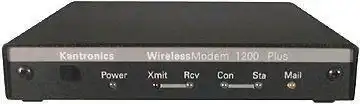 Ever wonder what the "Mail" light is for on some TNCs?
Basically, inside the box of these TNCs is your own personal BBS (PBBS).
Other hams can connect to your TNC and leave you messages.
When this happens, the Mail light will start to flash letting you know you have mail!
Ever wonder what the "Mail" light is for on some TNCs?
Basically, inside the box of these TNCs is your own personal BBS (PBBS).
Other hams can connect to your TNC and leave you messages.
When this happens, the Mail light will start to flash letting you know you have mail!
BBSs can also be setup to forward your pending messages directly to your PBBS so you won’t need to login and check for messages. Bulletins that you may be interested in can also be sent in this fashion. Some PBBSs support compression making the transfer of messages even more efficient for the network.
You can also draft and reply to messages within your PBBS, allowing your PBBS to forward the messages to the BBS for ultimate delivery.
Forwarding to PBBSs must be manually configured by the SYSOP.
H-Addresses
BBSs move personal messages around using a hierarchical routing address (h-address). The format is:
@BBScall.#local area.state-province.country.continent
The h-address for CBBBS is @WG3K.#SMD.MD.USA.NOAM. Users of CBBBS are thus located on the WG3K BBS, which is located in Southern Maryland, which is located in Maryland, which is located in the United States of America, which is located on North America.
From the perspective of another BBS, somewhere on the globe, to route a message to a user on CBBBS it doesn’t necessarily need to know how to get to the BBS but rather how to get it to a BBS that does. First it looks for a route to #SMD, and then MD, and then USA, and then NOAM before routing it to the proper BBS for further forwarding.
A good example of this is the bulletin shown above. The routing of that messages looks like this:
Originated on BBS LU9DCE.TOR.BA.ARG.SOAM in Argentina, South America
Was then forwarded to W0ARP.#NCO.CO.USA.NOAM in Colorado, North America
Was then forwarded to N3HYM.#FRDK.MD.USA.NOAM in Frederick, Maryland
Was then forwarded to WG3K.#SMD.MD.USA.NOAM.
|
Tip
|
Not all messages have a #local area part of their address. |
If you don’t know the exact h-address of a user, a partial address can be used for delivery.
Whitepages
Whitepages are similar to a phone book where user’s name, home BBS, location, and zipcode are listed. Whitepages are used when sending a message to another user where the H-address is not provided. Like our example of sending a message, above:
de WG3K>
sp wg3k
Address @WG3K.#SMD.MD.USA.NOAM added from HomeBBS
The system automatically added the H-address based on WG3K’s entry in the Whitepages.
Whitepages are updated based upon what information users add to their BBSs and what addresses are seen when messages are forwarded through a BBS. This information is then transmitted to neighboring BBSs daily.
|
Tip
|
It is important to keep your whitepage up to date. Using the HOMEBBS command will tell other users how to send you a message. Using the N command will set your name. Using the Q command will set your QTH (town, state). |
All the Commands
To get a list of all commands, type ?. These commands include:
-
A - Abort Output
-
B - Logoff
-
CMSPASS Password - Set CMS Password
-
D - Flag NTS Message(s) as Delivered - D num
-
HOMEBBS - Display or get HomeBBS
-
INFO - Display information about this BBS
-
I CALL - Lookup CALL in WP Allows CALL CALL CALL wildcards
-
I@ PARAM - Lookup @BBS in WP
-
IZ PARAM - Lookup Zip Codes in WP
-
IH PARAM - Lookup HA elements in WP - eg USA EU etc
-
K - Kill Message(s) - K num, KM (Kill my read messages)
-
L - List Message(s) -
-
L = List New
-
LR = List New (Oldest first)
-
LM = List Mine
-
L> Call
-
L< Call
-
L@ = List to, from or at
-
LL num = List msg num,
-
L num-num = List Range
-
LN LY LH LK LF L$ LD = List Message with corresponding Status
-
LB LP LT = List Mesaage with corresponding Type
-
LC = List TO fields of all active bulletins
-
LISTFILES or FILES - List files available for download
-
N Name - Set Name
-
NODE - Return to Node
-
OP n - Set Page Length (Output will pause every n lines)
-
PASS Password - Set BBS Password
-
POLLRMS - Manage Polling for messages from RMS
-
Q QTH - Set QTH
-
R - Read Message(s) - R num
-
RM (Read new messages to me)
-
RMR (RM oldest first)
-
READ Name - Read File
-
S - Send Message
-
S or SP Send Personal
-
SB Send Bull
-
ST Send NTS,
-
SR Num - Send Reply
-
SC Num - Send Copy
-
-
-
X - Toggle Expert Mode
-
YAPP - Download file from BBS using YAPP protocol
License
WG3K Bulletin Board System by Eric H. Christensen, WG3K is marked with CC0 1.0 Universal.